


Add customers phone to the contact us form in osCommerce
multimixer | learn | Friday November 26 2010
The “contact us” form consist in osCommerce of 3 fields: name, email and enquiry. What if you need for example your visitors phone number, so you can call them back?

Let’s add one more field to the contact us form. I’ll explain here how to do it for a phone number, you can do it for virtually any additional information you need.
Since we talk about the “contact us” form, the closest file to look at is of course the file catalog/contact_us.php. There is no real difference between RC2a and v2.3. LIne numbers in this post refer to v2.3
We’re going to add the input field for the phone number right under the email address field. The lines we need are
      <tr>
        <td class="fieldKey"><?php echo ENTRY_EMAIL; ?></td>
        <td class="fieldValue"><?php echo tep_draw_input_field('email'); ?></td>
      </tr>
That’s the creation of the input field for the email. We just copy it, make it to be an input field for the phone number and add our new code just after
      <tr>
        <td class="fieldKey"><?php echo ENTRY_PHONE; ?></td>
        <td class="fieldValue"><?php echo tep_draw_input_field('phone'); ?></td>
      </tr>
Next thing is to include the phone number into the email. The section of the file that do this is here
    $name = tep_db_prepare_input($HTTP_POST_VARS['name']);
    $email_address = tep_db_prepare_input($HTTP_POST_VARS['email']);
    $enquiry = tep_db_prepare_input($HTTP_POST_VARS['enquiry']);
Here we define 2 new variables $phone and $email_body by adding this just after
	// add phone 26 11 10
	$phone = tep_db_prepare_input($HTTP_POST_VARS['phone']);
	// add email body 26 11 10
	$email_body = EMAIL_TEXT_CUSTOMER_NAME . ' ' . $name . "\r\n" . EMAIL_TEXT_CUSTOMER_EMAIL . ' ' .  $email_address . "\r\n" . EMAIL_TEXT_CUSTOMER_PHONE . ' ' . $phone . "\r\n" . EMAIL_TEXT_CUSTOMER_MESSAGE . ' ' . $enquiry;
To $email_body we added the existing $name, $email_address and $enquiry. It’s much more handy that way, because we can add to it any new field we need anytime
Next thing is to include our new created $email_body into the mail function. So we replace in the existing function
tep_mail(STORE_OWNER, STORE_OWNER_EMAIL_ADDRESS, EMAIL_SUBJECT, $enquiry, $name, $email_address);
the $enquiry with $email_body, so it looks like this
tep_mail(STORE_OWNER, STORE_OWNER_EMAIL_ADDRESS, EMAIL_SUBJECT, $email_body, $name, $email_address);
Last thing is to define what the text entries, like “ENTRY_PHONE” are.. If we don’t do it we will see the words “ENTRY_PHONE” printed on our screen. To do this, we need to go to file catalog/includes/languages/english/contact_us.php and add following definitions to the end of the file, before the last ?>
define('EMAIL_TEXT_CUSTOMER_NAME', 'Name:');
define('EMAIL_TEXT_CUSTOMER_EMAIL', 'email:');
define('EMAIL_TEXT_CUSTOMER_PHONE', 'Phone:');
define('EMAIL_TEXT_CUSTOMER_MESSAGE', 'Message:');
define('ENTRY_PHONE', 'Your phone number:');
That’s it. Now we can take a look at our contact us page
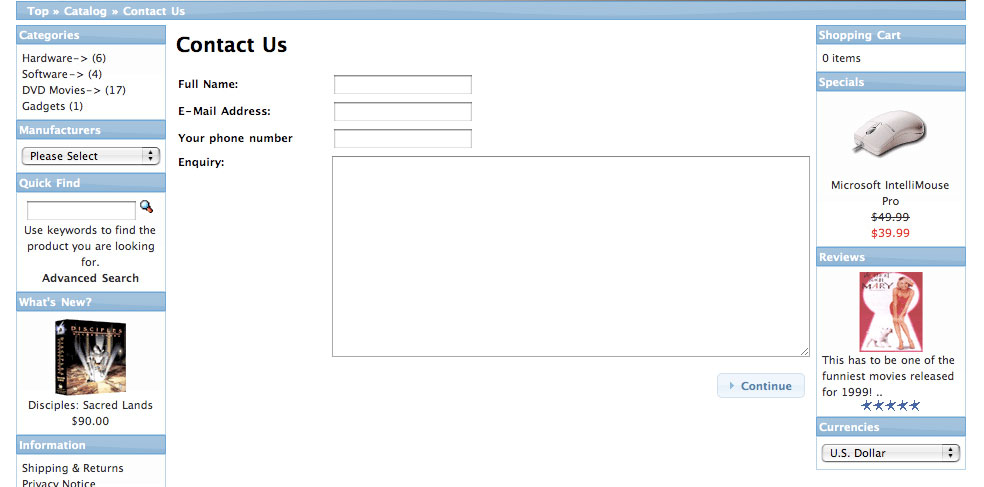
In the same way you can create input field for any type of information, a new second text-area, a checkbox, a drop-down or radio buttons. There are pre-defined functions in osCommerce that make it easy
Enjoy

multimixer

Follow me on twitter. I'm not tweeting all day long and guaranteed no spam and no advertising.



I am not a PHP programmer and I appreciate the TUT’s! I think you may have an error in the last part of your tutorial here. The line:
define(‘EMAIL_TEXT_CUSTOMER_MESSAGE’, ‘Message:’);
Was listed twice so I think you may have meant to add:
define(‘ENTRY_PHONE’, ‘Your Phone Number:’);
instead.
Thanks again for the TUT’s!
You are right, that was a mistake from my side, thanks for pointing that out. It’s corrected now
i didadd the file as exlained but i stiil see ENTRY_PHONE on my screen.
thank for the Help!!!!
really apreciaed
There was a small mistake from my side, as pointed out in the comment above.
Following was listed twice and wrong:
define(‘EMAIL_TEXT_CUSTOMER_MESSAGE’, ‘Your Phone Number:’);
Delete the above line and replace it with:
define(‘ENTRY_PHONE’, ‘Your Phone Number:’);
The post is corrected now, so you can take the relevant code from there and copy it into your file
Hi. Can you show us please how to add a drop down list to a field in this form?
Thx!
Did it. If anyone is intrested:
’6′, ‘text’ => ‘Bentley’);
$model[] = array(‘id’ => ’7′, ‘text’ => ‘BMW’);
$model[] = array(‘id’ => ’8′, ‘text’ => ‘Bugatti’);
$model[] = array(‘id’ => ’9′, ‘text’ => ‘Buick’);
?>
and all the other lines Multimixer said.
Hope this help.
Hi,
I’m trying to add informations on the contact page under the contact form.
I’d like to add adress, phone etc. and also a script from googlemaps.
I have version 2.3.1
thanks for help.
do we need to check or validate on the input to the added field? in this case the phone field?
You can if you want, question here is what to validate exactly? You can check if there is anything typed in, if the entry has a minimum length etc
Don’t know how you could check if the entry is a real and valid phone number
I’m fighting with a drop-down list that I added to a modified contact_us file. the input_fields work fine (thanks for the tut), but the pull_down just won’t.
Here’s the code
$duration = tep_db_prepare_input($HTTP_POST_VARS['duration']);
$duration_array = array();
$duration_array[] = array(‘id’ => ’0′, ‘text’ => ’12 Monate’);
$duration_array[] = array(‘id’ => ’1′, ‘text’ => ’24 Monate’);
$duration_array[] = array(‘id’ => ’2′, ‘text’ => ’36 Monate’);
What’s it’s supposed to do? Show a pull_down_list with 3 selections. Customer selects one and I get it emailed to me when he hits submit.
$duration gives me the variable for the email output
the $array should be good too, I followed the requirements for the tep_draw_form function.
Now for some reason the website shows an empty pull down list (no default and no selectors)
Any ideas?
https://gist.github.com/anonymous/5701866
another try to display the code that I use to call teh pull_down (there should be a preview funtion… would have helped to avoid extra posts for dummies like me)
James,
It is very easy to create a drop down menu and place it to anywhere you want. I’ll make a new post about this soon.
There is also a forum topic that explain this: http://forums.oscommerce.com/topic/342527-how-to-create-a-drop-down-selection-menu/
If it was not for multimixer, oscommerce would be in trouble. Thanks for sharing your valuable knowledge George!
If one would like to make the contact number compulsory – do you perhaps have any information on how to do this?
Regards, Johann (South Africa)
Hi Johann
You need to validate the field before processing the form submission
You could take a look at create_account.php to see how it is done there