


How to upgrade your jQuery UI version in osCommerce
multimixer | learn | Thursday January 6 2011I posted some time ago about how to get a new (ui) theme for your osCommerce store. Doing this today, you will notice that jQuery UI upgraded their version, and that means that, if you want to get a new ui theme, you have to upgrade the ui version that is used in your osCommerce store too.
No panic, things are easier as they sound, just a couple of files to replace, but first, let’s take things from the beginning:
osCommerce uses jQuery version 1.4.2 and jQuery UI version 1.8.6. The latest jQuery UI version (that is required by the themes to function) uses jQuery version 1.4.4 (the latest) and jQuery UI version 1.8.7. You will also note that any new theme you download from themeroller uses a file “jquery-ui-1.8.7.custom.css”, and that’s a clear indicator that the theme belongs to the new UI generation
I red somewhere in the osCommerce forums that it would be enough to just rename the “jquery-ui-1.8.7.custom.css” changing the 1.8.7 to 1.8.6 and that’s it. I can not really say that I share this opinion, what I can say is, that doing so will result to expected and unexpected problems. I’m not a jQuery UI expert, but I want my datepicker to be working, just an example.
The correct thing is to upgrade, and thats easy to do.
First, let’s find the files that need to be changed in the osCommerce file structure. Here they are
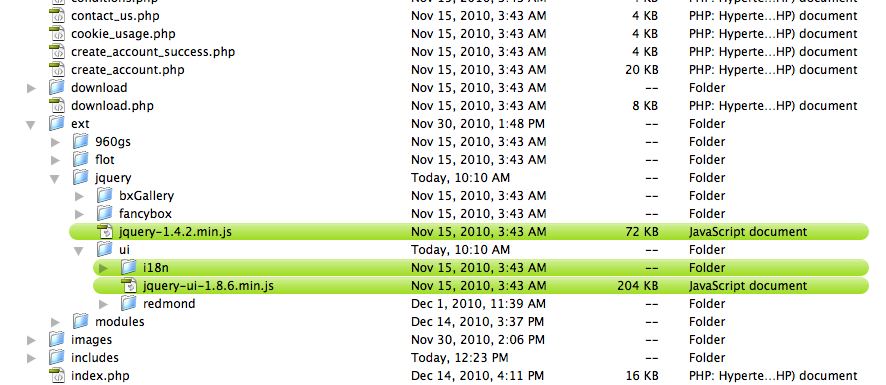
- catalog/ext/jquery/jquery-1.4.2.min.js
- catalog/ext/jquery/ui/jquery-ui-1.8.6.min.js
- and the folder catalog/ext/jquery/ui/i18n/
I made a picture where you can see how they look on my computer, they are marked with green
The new files we’ll find in the downloaded folder from jQuery UI. How and where to get this folder is described here. The files we need are marked with orange in the image below
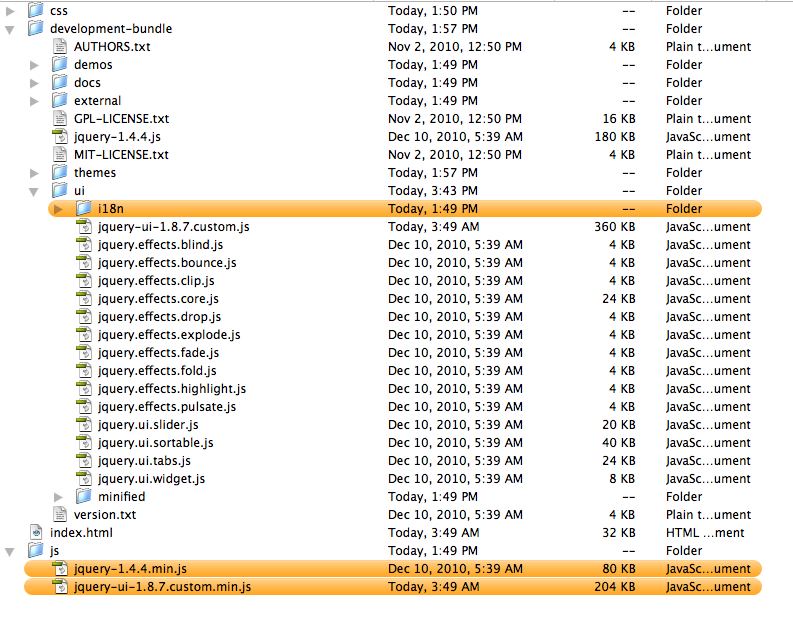
All we need to do now is to replace the green files of osCommerce with the new orange jQuery UI files. First we need to rename file jquery-ui-1.8.7.custom.min.js to be jquery-ui-1.8.7.min.js we just strip the word “custom”. No chance to do something wrong here
Last thing is to let our system know that we do use a new jQuery version now. To do this, we need to open file catalog/includes/template_top.php and find following lines
<script type="text/javascript" src="ext/jquery/jquery-1.4.2.min.js"></script>
<script type="text/javascript" src="ext/jquery/ui/jquery-ui-1.8.6.min.js"></script>
All we need to do here is to replace the number 1.4.2 with 1.4.4 and the number 1.8.6 with 1.8.7 so that our lines look like this
<script type="text/javascript" src="ext/jquery/jquery-1.4.4.min.js"></script>
<script type="text/javascript" src="ext/jquery/ui/jquery-ui-1.8.7.min.js"></script>
Of course, also the line No 29 need’s to be changed, the one that refers to the UI theme to be used, we need to use a version 1.8.7 theme, that’s finally the reason of the upgrade.
<link rel="stylesheet" type="text/css" href="ext/jquery/ui/redmond/jquery-ui-1.8.6.css" />
The process to do this is described here, just use 1.8.7 instead of 1.8.6
Enjoy

multimixer

Follow me on twitter. I'm not tweeting all day long and guaranteed no spam and no advertising.



Upgrading jQuery to 1.6.2 causes the text “undefined” to appear below the product image on the product info page. I just changed one line in template top to use jQuery 1.6.2 and encountered this problem.
Very clear easy to use tutorials you have here! Extremely useful site.
Todd
Hi Todd
Thanks for the comment, I wasn’t aware of the “undefined” issue, will try and see
It turned out that it is a bx gallery issue. Here is the related forum post http://forums.oscommerce.com/topic/379365-text-undefined-under-product-image/page__pid__1600759#entry1600759
Thanks for your tutorials, I am delivering two websites using oscomerce for the first time and has lessened the pain of using new technogies.
My site not live yet, but just wanted to say thanks for the posts. Very very clear and professionally done.
Cheers!
Hi George,
About the bx gallery “undefined” issue, can we simply add the title attribute to the code in product_info.php so it uses the product name as its caption:
$pi_entry .= ‘” target=”_blank” rel=”fancybox” title=”‘ . $product_info['products_name'] . ‘”>’ . tep_image(DIR_WS_IMAGES . $pi['image']) . ‘‘;
Or maybe even better by adding an extra column in product description table so that each product picture owns a unique caption, which may be good for SEO purpose?
I actually tried out the first one and it worked, but I am not sure if it’ll introduce any side effect. See the demo here:
http://www.bugdorm.com/product_info.php?products_id=34
Thanks!
Hi Eddy
Yes, hat’s the best way to go in my eyes too, to add the products name as a title for the link to the products image. Not only that you escape the “undefined” error without having to hack around in the bx gallery script, you also get a title on the pop up image
I will do a post soon about more options regarding this, all very simple and easy to do
As for adding input fields in admin for unique image titles, that is also not too hard to do, would require however to modify the database (table products_description probably) and add new fields to there and to create the corresponding input fields in admin in file admin/categories.php
Hi George,
Parameters that can alter FancyBox behaviors have never been very well documented by anybody in the official osC forum. A post covering those features would be much appreciated!
have been trying to change the template from original oscomerse redmond and have followed outline but where you say about changing custom 1.8.6.css on the theme creator you have i get a 1.9.2 and when i try to get the new theme installed what happens is that i loose all the blue and am left with all the text and no boxes. have reverted to redmund for time being.
any ideas. am pretty new to this stuff but it seems straight forward the way you have explained it.so point me in the right direction if poss. thanks.
Hello, I have read your article to update the jQuery UI version 1.8.7
I have downloaded a theme (blitzer) and I found the follow files in the map js:
jquery-1.9.1.js (268 381)
jquery-ui-1.10.2.custom.js (436089)
jquery-ui-1.10.2.custom.min.js (228 062)
How do I handle these for a correct update from the jQuery?
Best Regards,
Roger
Bringing the old thread to life..
I just updated my 2.3.1. to jquery 1.11.0 and UI to 1.10.4. Works perfect.
The only problem I have now is that the images (on enlarge) open in a new tab/window.
Any ideas?
It looks like you have a couple of js errors on your site, you can use firebug to check them
Among others, you have: TypeError: $(…).fancybox is not a function
You could use query migrate to solve the incompatibility: https://github.com/jquery/jquery-migrat
Some other ideas here: http://stackoverflow.com/questions/14344289/fancybox-doesnt-work-with-jquery-v1-9-0-f-browser-is-undefined-cannot-read
Hi again,
Thanks so much for the links. Just took some time to figure out how to use the migrate tool.. Important to put the code right after the jquery script…
But it seems to be more of a quick fix, not a permanent solution. Wouldn’t a fancybox upgrade to v2 be a better alternative?
Yes, fancybox version 2 has no issues, you can purchase it if you want, please check here: http://fancyapps.com/fancybox/#license