


Add a remove button to the shopping cart page
multimixer | learn | Thursday January 5 2012In version 2.3.1 of osCommerce, there is no remove button for items placed into the shopping cart, but a plain text link. On top of this, the link text is also “hardcoded”, so it always says “remove”, doesn’t matter what language you have in use in your store.
That is how the shopping cart page look by default
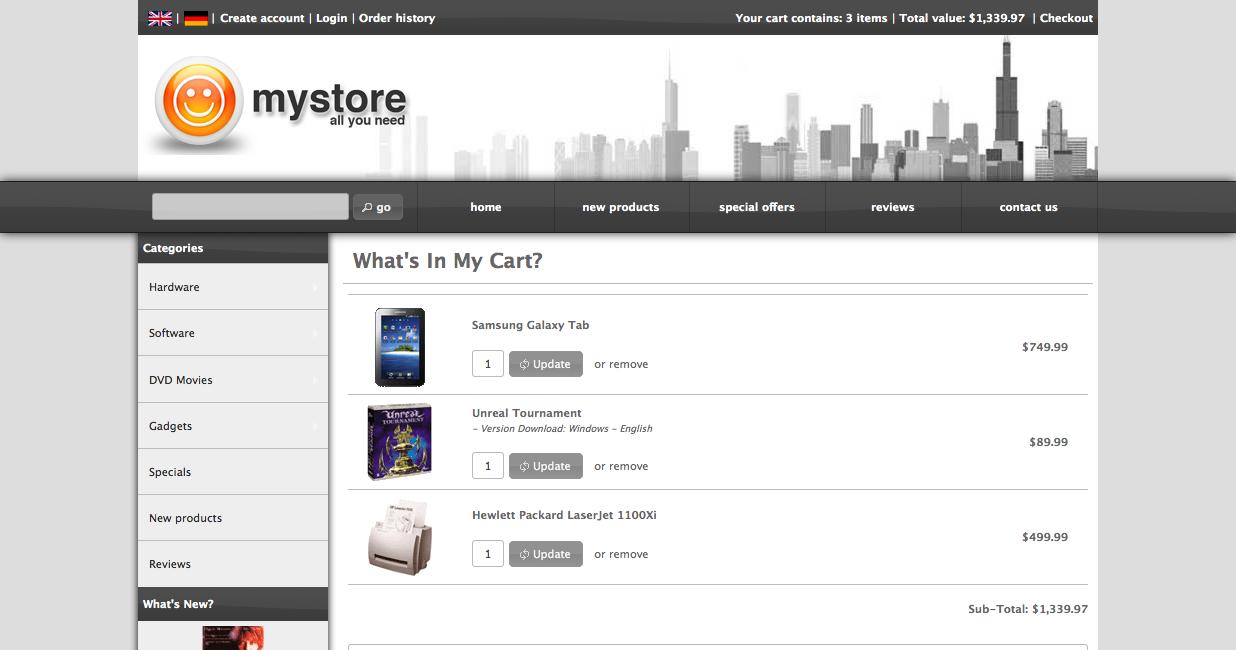
Let’s change this, and let’s create a multilingual button, that will look consistent with all other buttons all over your store. The file we need to work on is
catalog/shopping_cart.php
Make a copy of that file so you can replace the file you are working on, in case you mess anything up. At about line 97 we can see there following piece of code
$products_name .= '<br /><br />' .
tep_draw_input_field('cart_quantity[]', $products[$i]['quantity'], 'size="4"') .
tep_draw_hidden_field('products_id[]', $products[$i]['id']) .
tep_draw_button(IMAGE_BUTTON_UPDATE, 'refresh') .
'   or <a href="' . tep_href_link(FILENAME_SHOPPING_CART, 'products_id=' . $products[$i]['id'] . '&action=remove_product') . '">remove</a>';
To make it a bit more clear what’s happening here, let’s break the code into separate lines
$products_name .= '<br /><br />' .
tep_draw_input_field('cart_quantity[]', $products[$i]['quantity'], 'size="4"') .
tep_draw_hidden_field('products_id[]', $products[$i]['id']) .
tep_draw_button(IMAGE_BUTTON_UPDATE, 'refresh') .
' or <a href="' . tep_href_link(FILENAME_SHOPPING_CART, 'products_id=' . $products[$i]['id'] . '&action=remove_product') . '">remove</a>';
The “remove” link is following
' or <a href="' . tep_href_link(FILENAME_SHOPPING_CART, 'products_id=' . $products[$i]['id'] . '&action=remove_product') . '">remove</a>'
As you can see, the words “or” and “remove” are hardcoded into the file and the result is the plain text link you can see on your screen. This we are going to replace by a nice button. This is the code we are going to use
tep_draw_button(IMAGE_BUTTON_REMOVE, 'trash', tep_href_link(FILENAME_SHOPPING_CART, 'products_id=' . $products[$i]['id'] . '&action=remove_product'))
As you can see, the link part, including it’s “action” is exactly same as before. New is, that we use the tep_draw_button function of osCommerce
IMAGE_BUTTON_REMOVE is the text for our button, this we wil add later to file catalog/includes/languages/english.php. The word “trash” is for the icon we want to use on the button, we can use any of the available icons of the jQuery ui theme.
So, our code looks now like this
$products_name .= '<br /><br />' .
tep_draw_input_field('cart_quantity[]', $products[$i]['quantity'], 'size="4"') .
tep_draw_hidden_field('products_id[]', $products[$i]['id']) .
tep_draw_button(IMAGE_BUTTON_UPDATE, 'refresh') .
tep_draw_button(IMAGE_BUTTON_REMOVE, 'trash', tep_href_link(FILENAME_SHOPPING_CART, 'products_id=' . $products[$i]['id'] . '&action=remove_product'));
and in one line, as it was before, like this
$products_name .= '<br /><br />' . tep_draw_input_field('cart_quantity[]', $products[$i]['quantity'], 'size="4"') . tep_draw_hidden_field('products_id[]', $products[$i]['id']) . tep_draw_button(IMAGE_BUTTON_UPDATE, 'refresh') . tep_draw_button(IMAGE_BUTTON_REMOVE, 'trash', tep_href_link(FILENAME_SHOPPING_CART, 'products_id=' . $products[$i]['id'] . '&action=remove_product'));
Copy-pasters in a hurry, can just replace line 97 of their file with this line here
Next thing we need to do is, to define the text we want to have displayed on our new button, this we do in file
catalog/includes/languages/english.php
Here you can add anywhere before the last closing ?> following into the file, it will be better of course if you add it close to the other button text defines
define('IMAGE_BUTTON_REMOVE', 'Remove');
Please note that this define is globally available all over your sore, so you can use the same constant anywhere else you want to have the text “remove” displayed. You can change the text of course to anything that fit your needs, eg to “kuku” and you need to add the same define to your other main language files in case you use more languages (eg german.php, spanish.php, swahili.php etc)
Lets lake a look now how our shopping cart page look like
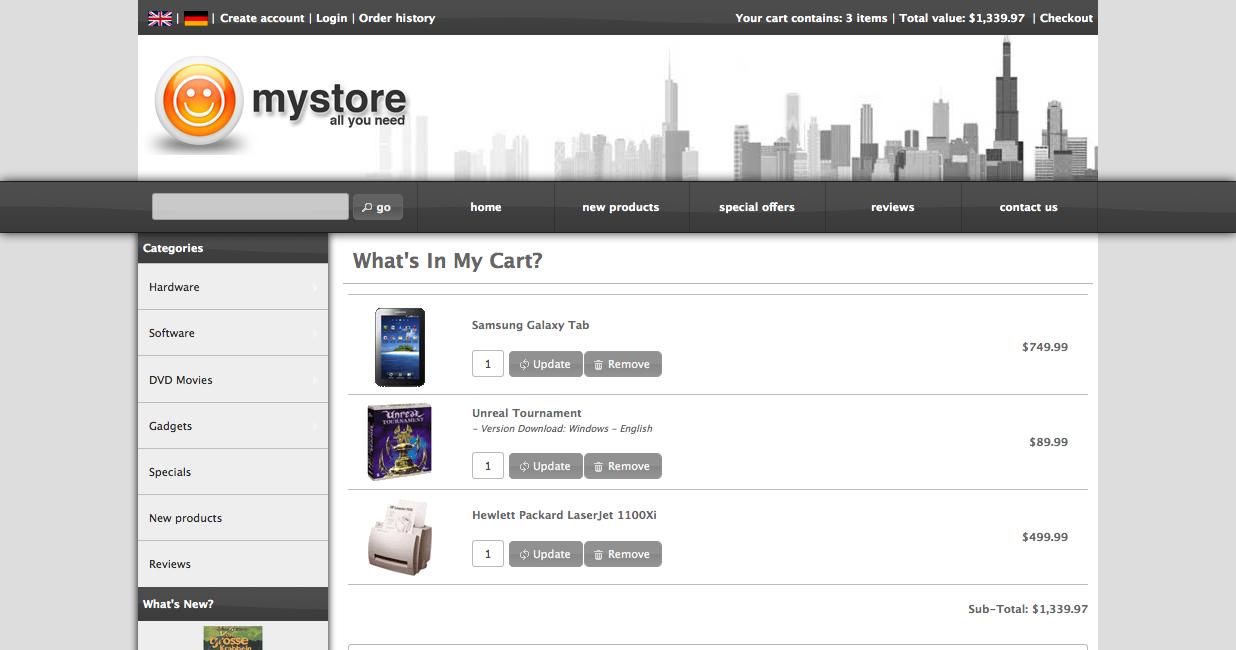
Easy not? Enjoy and lets hope that nobody is going to press this :)
In case you are interested, here’s an other interesting post about how to remove all items from the shopping cart
Front page trash can image taken from wp clipart, thank you guys

multimixer

Follow me on twitter. I'm not tweeting all day long and guaranteed no spam and no advertising.



published in November 20, 2010 :
https://github.com/oscommerce-france/oscommerce2/commit/a188a7cf646e2ca86c506fe826cdc1c15f4931ae
oscommerce france : a step ahead. ;)
Hi Laurent
Yes, that’s true, but people do not download osCommerce from github and also do not search there for upgrades.
The official osCommerce download does contain the file with the plain remove link and many people have issues with this, that’s why my post.
It makes me wonder however, why the official download package has not been updated yet, that is not the only issue. Even small fixes like this, would make peoples life much easier
All credits to you, Vive La France :)
thanks for this awesome tip.
I followed it and it works great but I have a slight hick up.
the quantity, update button are on the same line as the product name which means that if the product name is long the remove button falls under. it doesnt look classy.
is there anyway we can have a line break from the product name? just like one the “after” pic you have put on.
your help would be greatly appreciated.
Thanks
Hi Biru
The “after” pic use exactly the same code as posted here, the code starts with $products_name .= ‘<br /><br />’ . etc and this should create a line break under the products name and before the quantity input + buttons
Silly me missed the line break codes.
Thanks for sharing these info btw. You are a legend.
One more thing though if you wouldnt mind. Im having issues with having a space between the contents in the “bodycontent” section and the edge of the table.
For instance in a new oscommerce site where it says “welcome to blabla.com” the “W” is awfully close to the edge which is visible if we change the background. Is there a easy way to edit it? I tried putting “padding” on the stylesheet but it messes up the layout. :/
Your help would be greatly appreciated.
@ Biru, there is no reason to mess up anything, it depends on what exactly you apply the padding
Depending on how your site is structured you could try one of following
#bodyContent{margin-top:10px}
#header + div{margin-bottom:10px}
Thank you very much for this insight and help. The osC site I am working on makes so much more sense now :)
Thank you for the comment Atro
Just wanna say thank you. This explained a little to me to fix something NOT actually related to thed remove button.
Without this guide I may not have realised for some time :D
Thanks a lot I needed that ,
I added this and it worked fine for but now when I click the remove or update or continue buttons I get a white screen.
I’ve tried the refresh button but still get the same white screen so then the only way I get back to the cart is to click the back button or go back to the home page where it does show the item removed or updated but I don’t want that for my customers- PLEASE PLEASE HELP!
I need to get my site back right but don’t know what I did or how to fix?
My site is: http://www.mizzleea.com/BuyMZL/
Thanks for your Help!
@ Leea,
Obviously you did something wrong, best advice that I can give is, to restore your original file and try one more time with the modifications.
An other thing to do is, to turn “search engine safe urls” to “false” in your admin
I copied and replaced all the lines like I was supposed too (at least I think I did).
I double and triple checked it. The button works fine but the problem I have is it isn’t lining up with the update button. The remove button is higher up than the update button. The bottom of the remove button is lined up with the middle of the update button. Any idea what I did wrong?
Kinda looks like this:
_______
______ Remove
update ———–
———
Please provide a link to your website, it’s impossible to say anything without seeing
Hello.I am surprised. Very and rellay good work, and fast deployment.Thank you and congratulations.However I have some issues perhaps you could help me with, and avoid to review the whole scripts for mobile:- My website is in Spanish. The database is Latin 1;when I connect to the normal site, it works fine and the special chars are well formed, I mean (ed, e1, and so on), but when I connect to the mobile site, I don’t see well formed the chars, receiving the typical question mark or simmilar.As well as this issue, I don’t receive search results if I write with this chars.Where can I force the script to work in a specific code page.- My descriptions are long . it is necesary.For this reason they don’t fit the normal size for the results and all is bad formatted. What do you suggest as better solution, because I am thinking about trim the string.I cannot send you a link to the web site because it is running in a development server, but I can send you some logs or images if you need.Again, thank you very much and congratulations.Juan
It would help to see the site, however, for accented characters, the best way to go is using utf-8 everywhere: The page encoding and the database
Hello good evening,
First let me tell you it’s a pleasure to meet someone with large capacities and available to help those in need.
I applied this add-on but what happens is that the buttons are below 1 (update) and another on top (remove).
How do I align the two buttons?
regards,
Manuel
i have an align problem also. just in IE9 though. the upadate is higher than the delete button by a few pixels. i noticed this on a few sites while researching about buttons from the oscommerce forums.
I have a 1 px black border around update button in the active and visited state
in IE9. this is a seperate problem, but if oyu care to comment.
anyway, thanks for all that you do!!
craig
@manual and @craig: I will take a look at this and hope to post a solution soon
Hi George,
I found the “update” button in the shopping cart is a little bit flawed. Unlike the “remove” button, it would not just update the quantity for that specific product. Instead, any “update” button would update the whole cart including other products of which quantity field are changed. Unless this behavior can be adjusted, maybe there is not point to assign a “update” button to every listed product?
Thanks, Eddy
Yes, the update button updates the complete cart. It could be placed just once somewhere and do exactly the same job.
Regarding it’s placement, maybe it’s good there where it is now, beside each product, easier to find, and it’s like obvious that it need to be pressed when changing something in the cart, people may forget it, and move to checkout with the old quantities in cart
Regarding the behavior, I don’t know if it would be better to update just the one item you press the button for, any changes done to other products would get lost
The real solution would be an ajax based cart update function, not really hard to do, you can take a look to includes/classes/shopping_cart.php and includes/application_top.php to see how the process work
Hi Multimixer , thanks for putting this up here , very usefull!! now i go and do some more of whats on here ;-)
Thanks again.
Gr,
Rob
Hi Rob, thank you for the comment
Hello George
I made a new installation from the shopping cart file, because the buttons are not in the same line on Google Chrome, and in Explorer it is fine. Why I can not get it in the same line in Google Chrome and firefox?
Thank you in advance for helping
best regards
Marc
First Thank for all you help online I got a lot from you.
I would like to know how to remove ADD TO CART AND PRICES in oscommerce 2.3.1 and 2.3.3 any help will be welcome.
Thanks
Hello Ebrahim
The add to cart buttons need to be removed manually, they appear on 2 files, catalog/product_info.php and index.php
To remove the prices you need to modify function display_price() at is in file catalog/includes/classes/currencies.php
The topic is also covered in the osCommerce forum
Once again so many thanks.
I have gone to the 2files mention but I dont know what to do. can you please show me.
I am new to oscommerce.
Thanks
The add to cart buttons need to be removed manually, they appear on 2 files, catalog/product_info.php and index.php
To remove the prices you need to modify function display_price() at is in file catalog/includes/classes/currencies.php
The topic is also covered in the osCommerce forum
Hi all, i’m not to good on php and i can’t make changes because this lines are different on my page then in example here. Any help please ?
$products_name .= ” .
tep_draw_input_field(‘cart_quantity[]‘, $products[$i]['quantity'], ‘size=”4″‘) .
tep_draw_hidden_field(‘products_id[]‘, $products[$i]['id']) .
tep_draw_button(IMAGE_BUTTON_UPDATE, ‘refresh’) . ‘ ’
. TEXT_OR . ‘‘ . TEXT_REMOVE . ‘‘;
Best Regards
Mike
Hi Mike
Well, the code changed a bit in version 2.3.3, but it’s basically still same, just some constants for text added
Find this part
‘< a href="' . tep_href_link(FILENAME_SHOPPING_CART, 'products_id=' . $products[$i]['id'] . '&action=remove_product') . '" rel="nofollow">‘ . TEXT_REMOVE . ‘< /a>‘
And replace by this
tep_draw_button(IMAGE_BUTTON_REMOVE, ‘trash’, tep_href_link(FILENAME_SHOPPING_CART, ‘products_id=’ . $products[$i]['id'] . ‘&action=remove_product’))
can we have the “remove” as an image (obviously one from the languages/images/buttons folder to be multilingual)
im also struggling to make the delete button an image in the address_book_process page